LXCs are great, but LXC templates that are booted and instantly accessible over SSH and running services are better. The best part is that it’s done without iterative, stateful tools like Ansible or needing to provision before running a deployment tool like Colmena. It just works.
lxc.nix is where all the nitty-gritty is. A sample here is provided, and any other nix files need to be imported here to be baked into the tarball.
{ modulesPath, ... }:
{
  imports = [
    ./base.nix
    (modulesPath + "/virtualisation/proxmox-lxc.nix")
  ];
  boot.isContainer = true;
  # Supress systemd units that don't work because of LXC
  systemd.suppressedSystemUnits = [
    "dev-mqueue.mount"
    "sys-kernel-debug.mount"
    "sys-fs-fuse-connections.mount"
  ];
}
base.nix will be loaded in upon boot. Note that this is Nix, and if you update configuration.nix on the host later, this will be overwritten. Treat each template as stateful; make edits and recompile the tarball as needed.
{ pkgs, ...}:
{
  system.stateVersion = "24.11";
  users.users.nixos =
    {
      isNormalUser = true;
      extraGroups = [ "wheel" ];
      openssh.authorizedKeys.keys = [
        "ssh-ed25519 AAAAC3NzaC1lZDI1NTE5AAAAIIbtvGsRqXeaWMxilWAfzqCi2ng6Aiiy7xp8oBh+Ugiq nate@repono"
      ];
    };
  services.openssh = {
    enable = true;
    settings.PasswordAuthentication = false;
    settings.KbdInteractiveAuthentication = false;
    settings.PermitRootLogin = "no";
  };
  security.sudo.wheelNeedsPassword = false;
  environment.systemPackages = with pkgs; [
    vim
    binutils
    wget
  ];
}
The secret is in https://github.com/nix-community/nixos-generators. Build using
nix run github:nix-community/nixos-generators -- --format proxmox-lxc --configuration lxc.nix
In PVE, upload the template in Datacenter > pve > local (pve).
When creating the container, make sure Nesting is checked.
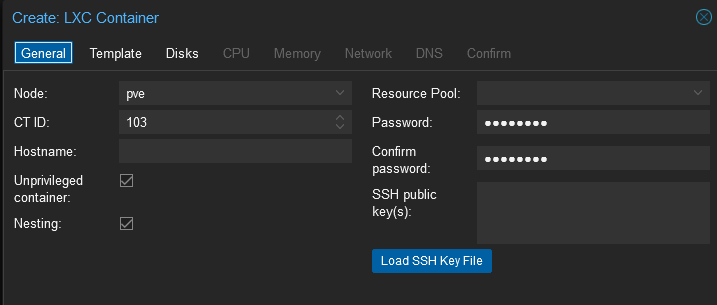 To avoid the busctl error patched 07/24
- Build image
- Run image
- Update nix channels as root
- Reboot.
- Install desired configuration.nix and attempt to switch to it
- Force a reboot sudo reboot -f